
Tansu SQLite: 48MB/sec, 114ms max latency with 20MB RSS
Tansu is an Apache licensed Open Source Kafka compatible broker, proxy and (early) client API written in async Rust with multiple storage engines (memory, null, PostgreSQL, SQLite and S3).
This article is the second in a series focused on the tuning of the SQLite storage engine used in Tansu. The first article covered tuning the broker with the null storage engine using cargo flamegraph which will also be used in this article.
SQLite
The SQLite storage engine is embedded in the Tansu broker. Ideal for development, integration or test environments. Want to restore an environment? Copy 1 file. Perhaps also an initial production environment, with the option to scale to PostgreSQL or S3 if/when required.
The Apache licensed source code for this storage engine is available here. If you are interested in writing one, all storage engines must implement this trait to work with Tansu, please raise an issue first so that we can coordindate effort.
The tuning changes made in this article were covered by this issue on GitHub with full diffs of the changes.
Test Setup
You can build and run the tests locally after installing the
Rust toolchain,
just
and the
Apache Kafka distribution
(the performance test uses kafka-producer-perf-test which is part of Apache Kafka):
Clone the Tansu repository:
gh repo clone tansu-io/tansu
Test Run
To create a Flamegraph of the broker while running the SQLite storage engine use:
just flamegraph-sqlite
Leave the broker running for the moment and in another shell, create a test topic:
just test-topic-create
Run the producer performance test with a throughput of 100,000 records per second:
just producer-perf-100000
The first unoptimized run:
% just producer-perf-100000
kafka-producer-perf-test \
  --topic test \
  --num-records 2500000 \
  --record-size 1024 \
  --throughput 100000 \
  --producer-props bootstrap.servers=${ADVERTISED_LISTENER}

62716 records sent, 12525.7 records/sec (12.23 MB/sec), 1783.0 ms avg latency, 2384.0 ms max latency.
65925 records sent, 13174.5 records/sec (12.87 MB/sec), 2338.3 ms avg latency, 2371.0 ms max latency.
65475 records sent, 13087.1 records/sec (12.78 MB/sec), 2333.5 ms avg latency, 2401.0 ms max latency.
65700 records sent, 13140.0 records/sec (12.83 MB/sec), 2352.8 ms avg latency, 2408.0 ms max latency.
Only managing ~12,0000 records per second with an average (and maximum!) latency of ~2.3s. Hopefully, there is a lot of low hanging fruit to optimize away!
At the end of the run hit Control-C in the original flamegraph-sqlite shell,
a flamegraph.svg will be produced by the tool. For more background on flame graphs and performance tuning,
take a look at (and bookmark!) Brendan Gregg's website.
Hot Path Regex
Lets start by optimizing the widest column:
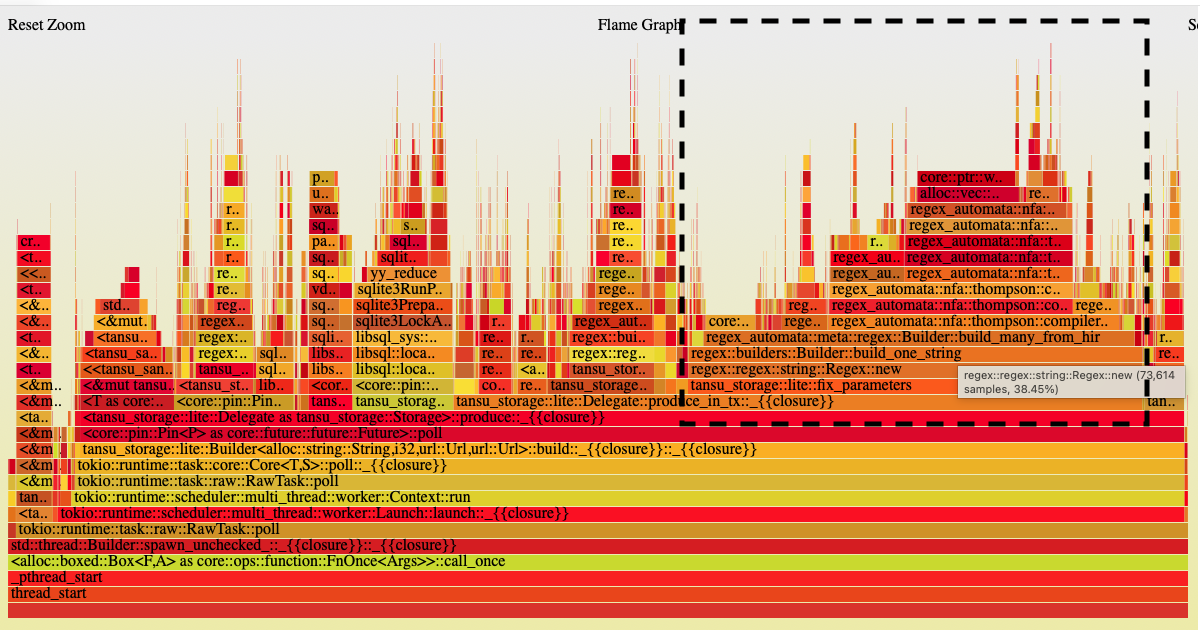
Looking at the above graph it reminded me of the root causes of production issues that I've seen:
Generally, the root cause of a production issue is either:
- The most recent release;
- An expired SSL certificate;
- DNS; or
- a regular expression in a hot path
The first run identified a very hot regex in the produce_in_tx function within the bowels of the SQLite storage engine
with a whopping 38% of all samples! Tansu shares the SQL used by both the
SQLite and
PostgreSQL engines to reduce duplication
(with the exception of the
DDL and some SQL date/time related functions).
For no better reason than the PostgreSQL engine was written first,
all the prepared statements use a $ prefix to parameters, rather than the ?
used by SQLite,
with a regular expression doing the conversion:
fn fix_parameters(sql: &str) -> Result<String> {
    // 38% (gasp!) of produce samples are in here:
    Regex::new(r"\$(?<i>\d+)")
        .map(|re| re.replace_all(sql, "?$i").into_owned())
        .map_err(Into::into)
}
Every prepare execute/query was using sql_lookup which in turn was calling fix_parameters each time:
// an example call to sql_lookup
// as part of prepared statement query/execute:
self
    .prepare_execute(
        tx,
        &sql_lookup("header_insert.sql")?,
        (self.cluster.as_str(), topic, partition, offset, key, value),
    ).await?
Where sql_lookup made a call to the regex using fix_parameters:
fn sql_lookup(key: &str) -> Result<String> {
    // result of calling fix_parameters is not being cached:
    crate::sql::SQL
        .get(key)
        .and_then(|sql| fix_parameters(sql).inspect(|sql| debug!(key, sql)))
}
A simple fix by using a
LazyLock to populate a
BTreeMap
of the SQL with the fix_parameters applied:
pub(crate) static SQL: LazyLock<Cache> = LazyLock::new(|| {
    Cache::new(
        crate::sql::SQL
            .iter()
            .map(|(name, sql)| fix_parameters(sql).map(|sql| (*name, sql)))
            .collect::<Result<_>>()
            .unwrap_or_default(),
    )
});
The collect::<Result<_>>() is iterating over the tuples created in map (each returns a Result<(&str, String)>).
I'm also using
type inference
here, with the compiler infering the type of _ as the return type.
Assuming each iteration is Ok the tuples will be gathered into a BTreeMap. Otherwise, the iteration will stop on the first Err resulting in an empty (default) map being returned.
The static SQL is then used by:
#[instrument(skip(self))]
async fn prepared_statement(&self, key: &str) -> Result<Statement, libsql::Error> {
    let sql = SQL
        .0
        .get(key)
        .ok_or(libsql::Error::Misuse(format!("Unknown cache key: {}", key)))?;

    self.connection.prepare(sql).await
}
I was hoping to cache the actual parsed prepared statement here (as I have done in PostgreSQL engine), but it doesn't appear to be supported in SQLite (I get a "statement already in a transaction" if I reuse a prepared statement within a transaction, even after calling reset).
The usage of instrument
is a nice example of using the tracing
crate to create a span with the key to include the time spent within this function when logging is enabled.
Copying Uncompressed Data
Caching the regular expression output, resulted in this frame graph:
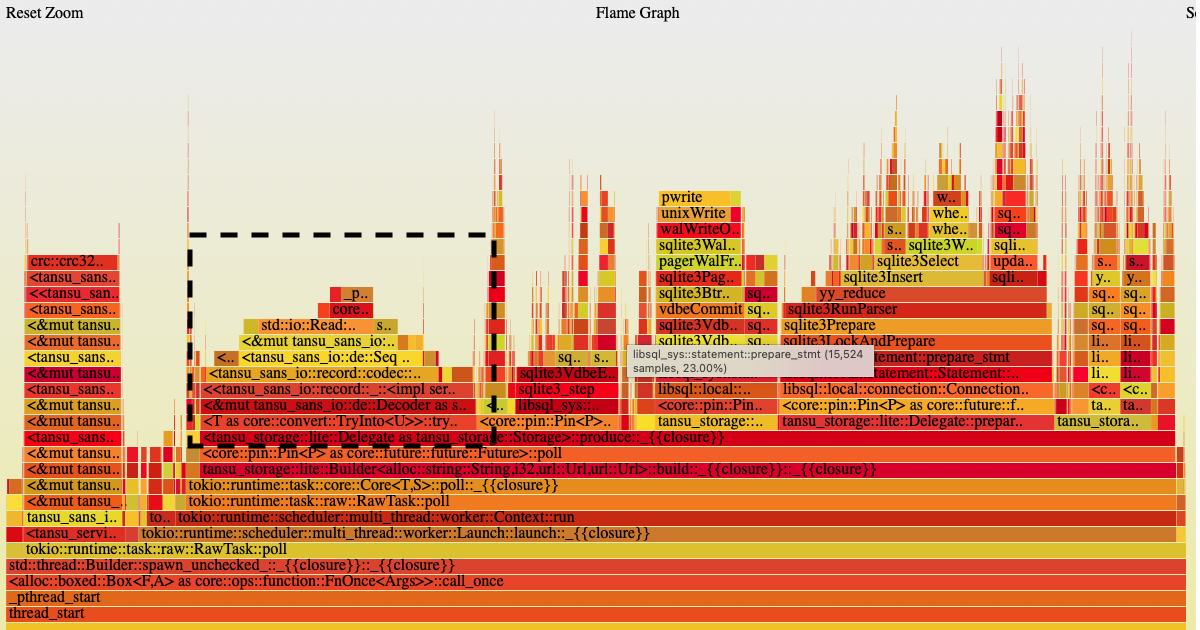
Most of the big columns are now within SQLite parsing and executing statements, the highlighted column includes some serialization. To the left of the highlighted block, there are also a lot samples involved in the CRC32 check of the produced record batch (which we will deal with later).
The highlighted column is copying data while deserializing a deflated record batch, Tansu needs to inflate using the Compression algorithm used in the batch. In cases, where the batch isn't compressed this results in unnecessary copying of data into an inflated record batch. For uncompressed data we can add an optimization using Bytes with split_to to take the deflated record batch and put the record directly into the inflated batch without moving or copying the underlying data, an O(1) operation:
impl Decode for Octets {
    #[instrument(skip_all)]
    fn decode(encoded: &mut Bytes) -> Result<Self> {
        let length = VarInt::decode(encoded)?.0;

        if length == -1 {
            // "null", nothing to do here
            Ok(Self(None))
        } else {
            // O(1): split without copying or moving the encoded data:
            Ok(Self(Some(encoded.split_to(length as usize))))
        }
    }
}
CRC
Running the test again, with the uncompressed data optimization, we now just have the CRC32 check remaining as the last column to optimize:
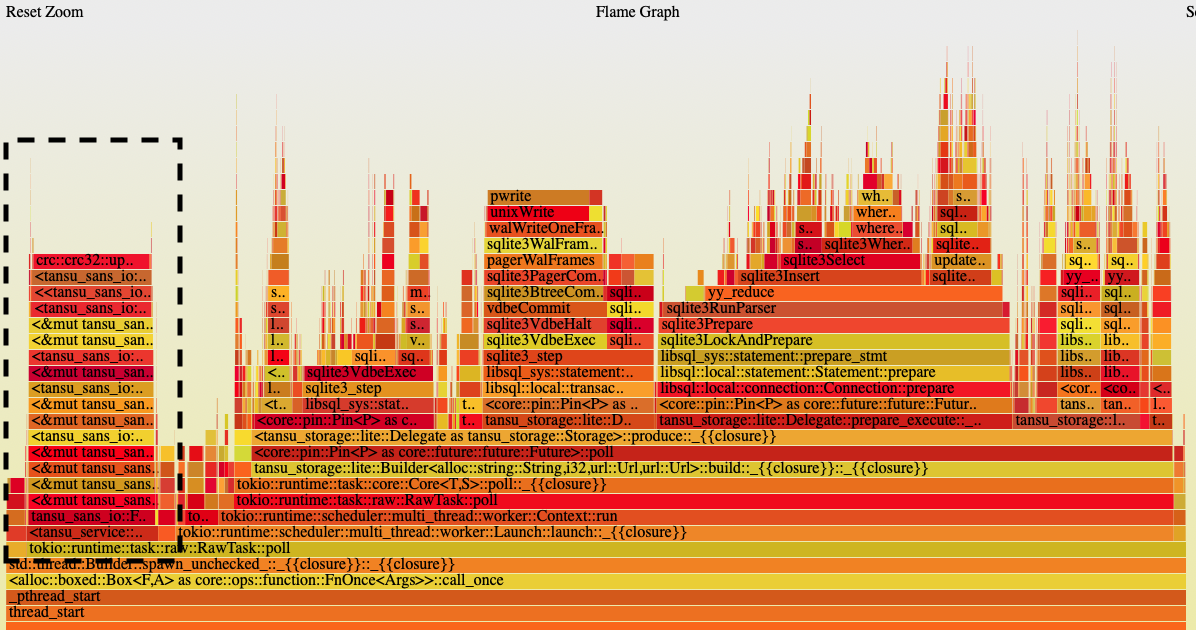
Ultimately, this involved using the crc_fast crate, which dramatically reduced the time spent in calculating the CRC32 for each batch:
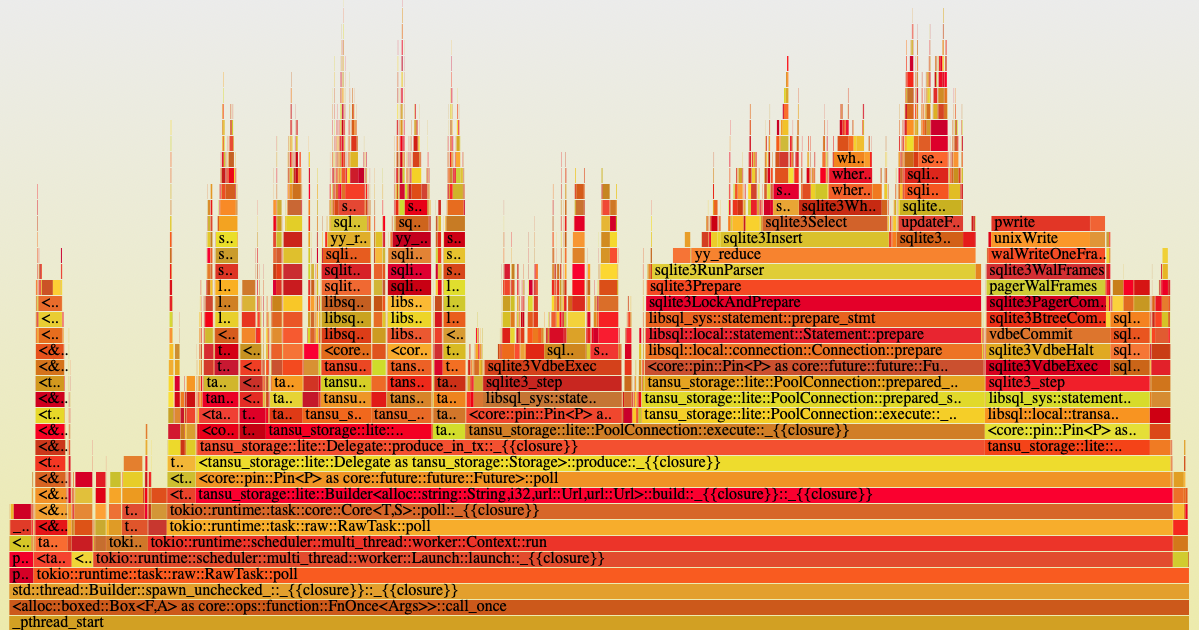
The remaining wider columns are each involved in preparing and executing SQL statements or writing WAL frames at the end of a transaction. I did look at reusing the pre-parsed prepared statements, but this didn't seem possible in SQLite.
Conclusion
So, after no real SQLite tuning at all, the result is a very different flamegraph compared to the starting position:
- Don't (re)run regexes when you can cache the result
- Avoid copying/moving memory where possible
- Use a fast CRC32 implementation
Results
On a Mac Mini M4 using a standard 128GB SSD, writing 50,000 records per second:
kafka-producer-perf-test \
  --topic test \
  --num-records 1250000 \
  --record-size 1024 \
  --throughput 50000 \
  --producer-props bootstrap.servers=${ADVERTISED_LISTENER}

249881 records sent, 49966.2 records/sec (48.80 MB/sec), 13.8 ms avg latency, 114.0 ms max latency.
250121 records sent, 50024.2 records/sec (48.85 MB/sec), 2.0 ms avg latency, 6.0 ms max latency.
249949 records sent, 49989.8 records/sec (48.82 MB/sec), 2.0 ms avg latency, 6.0 ms max latency.
250069 records sent, 49993.8 records/sec (48.82 MB/sec), 2.0 ms avg latency, 6.0 ms max latency.
1250000 records sent, 49988.0 records/sec (48.82 MB/sec), 4.39 ms avg latency, 114.00 ms max latency, 2 ms 50th, 4 ms 95th, 89 ms 99th, 108 ms 99.9th.
I'm unsure why the initial maximum latency is as high as 114.0ms, subsequent runs are much faster. Something that I want to dig into and understand further.
Broker memory footprint after the test run:
ps -p $(pgrep tansu) -o rss= | awk '{print $1/1024 " MB"}'
20 MB
Want to try it out for yourself? Clone (and ⭐) Tansu at https://github.com/tansu-io/tansu.
In this Performance Tuning series are:
- The first article tuned the broker with the null storage engine using cargo flamegraph
- You're reading this article which tuned a hot regular expression, stopped copying uncompressed data and used a faster CRC32 implementation using the SQLite storage engine
Other articles in this blog include:
- Route, Layer and Process Kafka Messages with Tansu Services, the composable layers that are used to build the Tansu broker and proxy
- Apache Kafka protocol with serde, quote, syn and proc_macro2, a walk through of the low level Kafka protocol implementation used by Tansu
- Effortlessly Convert Kafka Messages to Apache Parquet with Tansu: A Step-by-Step Guide, using a schema backed topic to write data into the Parquet open table format
- Using Tansu with Tigris on Fly, spin up (and down!) a broker on demand
- Smoke Testing with the Bash Automated Testing System 🦇, a look at the integration tests that are part of the Tansu CI system